


All new Bravo Acceptance app
Your car loan, in your pocket!
Check your balance, make payments and see your payment history, anytime, right from your phone. Free to download for every Bravo Acceptance customer.


iPhone
Scan for the App Store
Android
Scan for Google Play
What you can do
Everything about your loan, in one place
Your balance at a glance
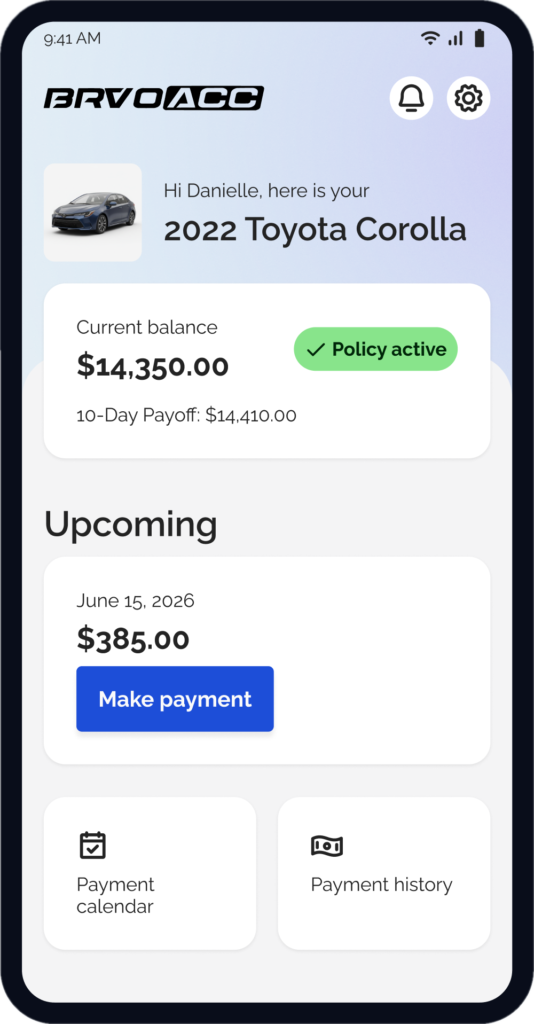
See your current balance, 10-day payoff and next payment due as soon as you sign in.
Pay your way
Pay with a debit or credit card, or with cash at stores near you, through our payment partner PayNearMe.
Know what’s due
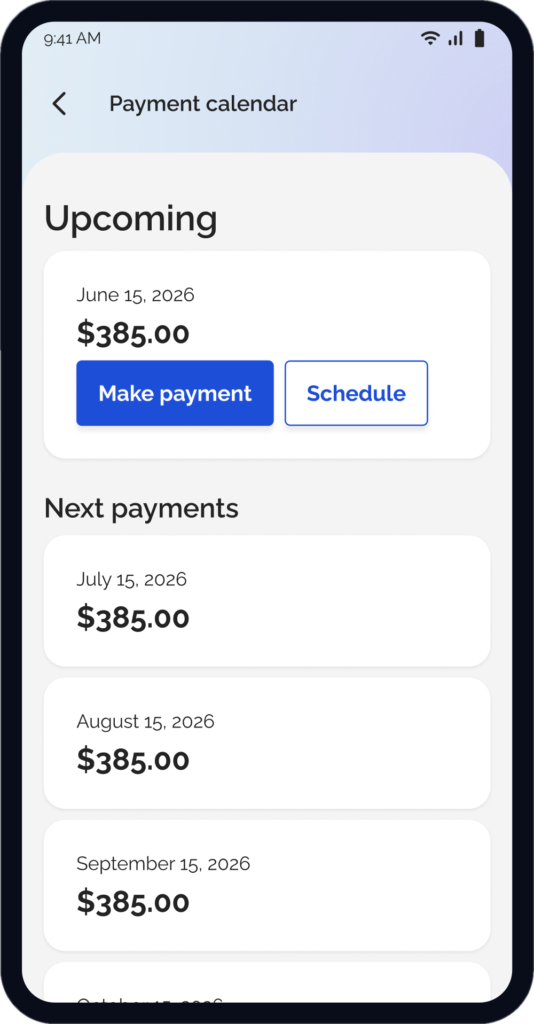
Your payment calendar shows upcoming due dates, and reminders help you stay on track.
Every payment, tracked
See the status of each payment and how it was applied to principal, interest and fees.
Get started
Up and running in four quick steps
Download the app
Tap a badge above, scan a code, or search “BRVO ACC” in the App Store or Google Play. Look for this icon.
Sign in with your phone
Enter the mobile number on your loan and verify with the 6-digit code we text you. No password needed. See how ›
Check your balance
Your home screen shows your vehicle, current balance, 10-day payoff and next payment due.
Pay or schedule
Tap Make payment to pay now through PayNearMe, or Schedule to pick a date. Track every payment in Payment history.
Just bought your car? Your account syncs overnight, so you can sign in and make payments starting the next business day.
How sign-in works

Request a code
In the BRVO ACC app, enter your mobile number, check the box to agree to receive a verification text, and tap Send code.

Get one text
Bravo Acceptance sends a single message with your 6-digit code. One message per request.

Enter the code
Type the code in the app and tap Verify to confirm your number. Then view your loan account and make payments.
Ways to pay
Cash, no fee at stores like 7-Eleven, CVS, Walmart and Walgreens (up to $1,000 per payment)
Debit card – $4.99 fee
Credit card – $5.99 fee
Fees are charged by PayNearMe and shown before you confirm.
Good to know
Texts are for login codes only. One text per request. Msg & data rates may apply. Reply STOP to opt out or HELP for help.
Turn on notifications in the app to get reminders before your payment is due.
Your number stays private. Bravo Acceptance does not sell or share it for marketing.
Your questions, answered
Frequently asked questions
How do I make my payment?
Pay in the app through our partner PayNearMe:
- Cash, no fee at participating stores like 7-Eleven, CVS, Walmart, Walgreens, Family Dollar and Kroger. Up to $1,000 per transaction.
- Debit card: $4.99 processing fee.
- Credit card: $5.99 processing fee.
PayNearMe charges all fees and shows them before you confirm. One-click payment in the app fills in your PayNearMe Loan ID for you.
How do I download the app and sign in?
Download BRVO ACC free from the App Store or Google Play. Open it, enter the mobile number on your loan, check the box to receive your sign-in text, and enter the 6-digit code we send. If you just bought your vehicle, sign in starting the next business day.
What if my payment is declined?
A decline means your payment method wasn’t approved, usually because of insufficient funds, a returned payment or a banking issue. Try a different payment method or run the same card again. If you’d rather not re-run your card, call us and a loan servicing administrator can help.
How do I update my payment method?
Use your PayNearMe account, in the app or at paynearme.com:
- Log in, or register if you don’t have an account yet.
- Open Settings, Account or Payment Preferences.
- Update your payment method, set up Autopay, or change the email or phone number used for statements and notifications.
- Save and confirm. Changes take effect on your next scheduled payment.
What happens if my payment is past due?
If a payment isn’t made by its due date, your account becomes past due, and the past-due balance grows until the account is brought current. Depending on how long it stays delinquent, and in accordance with your loan agreement and applicable law, this could result in:
- Late fees
- Negative information reported to the credit bureaus
- Temporary disabling of your vehicle’s starter, where permitted and after any required notice
- Repossession of your vehicle
Having trouble making a payment? Contact us right away. We may be able to discuss options to help you bring your account current.
What is CPI, and when does it apply?
Collateral Protection Insurance (CPI) protects the lender’s interest in your vehicle by covering physical damage if you don’t keep your required insurance in place.
CPI is not a substitute for your own auto insurance. It has no liability coverage and doesn’t protect you, your passengers or other drivers. You must still carry your own coverage, including liability, as your loan agreement and state law require. Keeping your own policy is how you avoid CPI charges.
If CPI is added because we don’t have proof of your insurance, the premium is billed with your regular payments. Once you provide proof of qualifying coverage, we’ll remove the CPI charge and refund any unearned premium as applicable.
How do I contact support?
Call (214) 301-3192 or email Customer.Service@GranitePassGroup.com. Hours: Monday–Friday 8 a.m.–7 p.m. CST, Saturday 9 a.m.–5 p.m. CST, closed Sunday. In the app, go to Settings › Help & Support › Contact us.
SMS Program Details
| Program name | BRVO ACC Verification Codes |
| Sender | Bravo Acceptance. Every message starts with “Bravo Acceptance:”. |
| What you receive | A one-time verification code to confirm your phone number and log in to the BRVO ACC app. |
| Message frequency | One message per code request. No recurring messages are sent. |
| Cost | Message and data rates may apply. |
| Help | Reply HELP to any message, or call Bravo Acceptance support at (214) 301-3192 . |
| Opt out | Reply STOP at any time. You will receive one confirmation text and no further messages. To receive codes again, reply START. |
| Carriers | Carriers are not liable for delayed or undelivered messages. |
Verification codes only
This program exists for one purpose: logging you in securely.
- Marketing or promotions
- Loan offers
- Payment reminders
- Collection messages
How you opt in
You give consent inside the BRVO ACC app, on the screen where you enter your mobile number, before any code is sent. Each new code requires a new request from you.
Consent Language Shown in the App
I agree to receive text messages from Bravo Acceptance with a one-time sign-in code sent to this number. One message per request. Msg & data rates may apply. Reply STOP to opt out, HELP for help.
The customer checks this box before tapping Send code. See our Privacy Policy and Terms of Use.
◉ Texts are sent only after you request a code in the app.
◉ Consent is collected in the app only, not on paper or by phone.
◉ Your number is used only to deliver the code you asked for.
◉ Consent is not a condition of any purchase or loan.
Your Privacy
We do not sell, rent or share mobile phone numbers or SMS opt-in consent with third parties or affiliates for marketing or promotional purposes. Text messaging originator opt-in data and consent will not be shared with any third parties.
About Bravo Acceptance
Bravo Acceptance is the auto finance company of Bravo Companies (Car Capital Corp), which also includes Bravo Auto Group, the operator of our dealerships. Bravo Acceptance is the lender on your account. Payments in the BRVO ACC app are processed by our payment partner, PayNearMe.
Can’t find what you need?
These answers are always in the app: Settings › Help & Support › Frequently asked questions.
Mon–Fri 8 a.m.–7 p.m. CST · Sat 9 a.m.–5 p.m. CST · Closed Sunday

Pricing and Vehicle Information Disclaimer: Advertised prices include a $150 documentary fee. A documentary fee is not an official fee and is not required by law but may be charged to buyers for handling documents relating to the sale. Applicable sales tax, title, license, registration, inspection, and other government-imposed charges are additional.
Vehicle prices, specifications, equipment, mileage, availability, and other information are believed accurate but may contain typographical, data-transmission, or inventory-feed errors. The dealership makes reasonable efforts to promptly identify and correct such errors. Please contact the dealership to confirm current pricing, availability, equipment, and purchase terms before visiting or completing a transaction. Photographs are for illustration and may not depict the exact vehicle or all installed equipment.
Advertised prices are available to retail purchasers unless a specific, clearly disclosed manufacturer incentive or eligibility requirement applies. Advertised prices are not conditioned on dealer financing, a trade-in, or a down payment unless that condition is clearly and conspicuously stated with the applicable offer. Optional products and services are not required to purchase a vehicle. Nothing on this website constitutes a binding purchase agreement. Final terms are stated in the executed buyer’s order and applicable purchase or finance agreement. All vehicles are subject to prior sale.
Site Map
- Versa
- Tucson
- Trax
- Taurus
- Soul
- Santa Fe Sport
- Rogue Sport
- Rogue
- Renegade
- RDX
- QX80
- QX30
- Patriot
- Pathfinder
- Pacifica
- Mustang
- Murano
- MKZ
- MDX
- Malibu
- Legacy
- Kicks
- Juke
- Highlander
- Grand Caravan
- Fusion
- Forte
- Flex
- F-150
- Explorer
- Expedition
- Escape
- Equinox
- Envision
- Encore
- Enclave
- Elantra GT
- Elantra
- Edge
- EcoSport
- CX-5
- Cruze
- CR-V
- Corolla
- Compass
- Civic
- Cherokee
- Camry
- C-HR
- Armada
- Accord
- Accent
- 300
- 200
- 1500 Classic
- 1500
- YouDrive – Louisville, KY
- YouDrive – Fort Worth, TX
- YouDrive – Elyra, OH
- YouDrive – Dallas, TX
- Fiesta Motors – Avenue J
- Fiesta Motors – 50th Street
- Drive Casa – Waco
- Drive Casa – Marvin D Love Fwy
- Drive Casa – Harry Hines
- Drive Casa – Garland
- Drive Casa – Fort Worth
- Drive Casa – Coming Soon
- Drive Casa – Buckner Blvd
- AutosFelix – Northwest Hwy